Flight Controls
Flight control is all based around throttle, pitch, roll, yaw, and inertia. It won't feel natural at first, but all you need to do is build that muscle memory.
Flight Controllers have different flight modes that they can use: Horizon, Angle, and Acro. These modes control how the controller responds to stick inputs and whether it should perform auto-levelling.
Angle - in angle mode the quad will remain level without stick input, if controls are applied and then removed the quad will auto-level again. Moving a stick to the extreme will not cause the quad to flip or roll.
Horizon - in horizon mode the quad will operate very similarly to angle mode, however if you move a stick to the extreme the quad will perform a flip or roll. Removing the input will cause the quad to auto-level again.
Acro - in acro mode the quad will not auto-level. It will require constant stick input to level the quad and it will allow any maneuver or "trick" to be performed with the correct inputs. The quad will retain is angular velocity unless counter-input is provided.
If you are looking to get into freestyle FPV flying, I strongly recommend you learn acro and stick to it. Some people will recommend you learn another "easier" mode first and then transition - I strongly disagree with this as you will need to "unlearn" habits from the other modes.
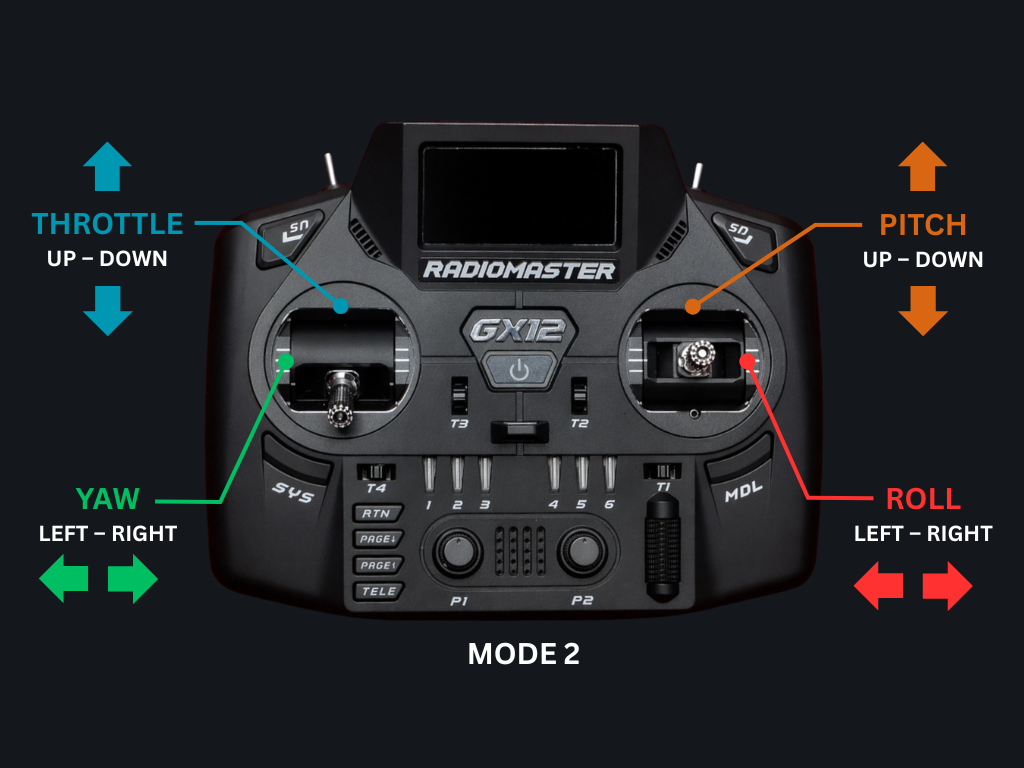
There are several "modes" that a controller can be set to, These are numbered Mode 1, 2 3, and 4. This controls which axis on the controller corelates to which movement of the quad: throttle, yaw, pitch, and roll.
Mode 2 is by far the most common and I recommend you ensure your controller is set to Mode 2. Typically in Mode 2 the right stick is auto-centering on both axis with the up-down axis being pitch and the left-right axis being roll. The left stick is auto-centering only on the left-right axis, which is for yaw and the up-down axis is non-centering and used for throttle.
These days the vast majority of controllers come by default set to Mode 2. However, if your controller has the non-centering axis on the right or you controls are not set up as shown above it is strongly recommended that you look in to reconfiguring your controller/quad as necessary.
Throttle
Your initial expectation may be that the throttle will make the quad go up - it does not. The throttle applies lift to the quad perpendicular to the plane of the propellers. Generally, when the quad is on the ground this is of course up! However, when you think about a quad in motion, as it performs rolls and pitch is applied the thrust will no longer be "up". For example, if I roll my quad so that it is inverted, applying throttle will actually cause it to race towards the ground!
So you'll need to keep a mental image of the current rotation of the quad to understand in what direction throttle will cause the drone to move. After a while this will become intuitive. The speed the quad is moving at is directly proportional to the amount of throttle and pitch. You can actually slow a quad down by applying throttle (whilst pitched in the opposite direction to the current angular momentum).
Pitch
Pitch adjusts the quads attitude by causing the nose of the quad to move up or down in relation to its relative position. So when flying straight and level this will cause the nose to drop. If the throttle is not changed the quad will lose altitude and increase in speed. If more throttle is applied then the altitude can be maintained but the quad will continue to accelerate.
A very important thing to consider when you first learn to hover and perform basic turns is the angle of your camera. The camera angle varies depending on the quad and its configuration, but is commonly between 20° and 45°. In normal straight and level flight this is very useful as with forward momentum this allows the camera to appear level with the horizon whilst moving forward - however when in the hover your view will be very slightly angled upwards.
Roll
Whilst pitch makes the nose of the quad move up and down, roll makes the whole quad rotate left or right. If you apply left roll, the left side of the quad will go down and the right side of the quad will go up, causing a counterclockwise roll.
However, just like with pitch you need to bear in mind the angle of your camera. The quad is not rotating around the camera view, but instead around the plane of the propellers. Also consider that when you are half-way through a 360° roll, your quad will be inverted, meaning that your thrust is now down towards the ground.
So whilst you absolutely can perform a basic roll by just moving the roll stick to the extreme, to perform a "perfect" roll (often called a "Coordinated roll") around the camera view, keeping the center of the camera pointed at a target, you will need to apply a small amount of yaw during the roll and you will need to reduce the throttle as you invert and increase it as your level off.
Yaw
We've covered pitch (nose up and down), roll (clockwise and counterclockwise around the camera), now there is yaw - which is a flat rotation left or right around the plane of the propellers. Of course this is also impacted by the camera angle just like roll is.
When you begin performing basic turns it is important to understand that you must coordinate the controls. This means to turn the quad smoothly to the left you must apply both a small amount of left roll and a moderate amount of left yaw.
This is where how you hold the controller really comes into play. Grab your controller and try to input full stick deflection to the left and then to the right. You may find bias in one direction - for example you will potentially find that your left thumb struggles to push your left stick all the way to the right and that you need to adjust your grip on the controller to allow full deflection. This can often lead to pilot bias where a pilot will perform good left turns but poor right turns.
As you learn basic turns be aware of that bias and your grip on the controller. Ensure that your hand position allows for full stick deflection and ensure you practise your right turns!